> ## Documentation Index
> Fetch the complete documentation index at: https://docs.cline.bot/llms.txt
> Use this file to discover all available pages before exploring further.
# ClinePass
> A low-cost monthly subscription that offers 2-5x the usage on popular open coding models compared to standard API rate.
ClinePass is a low-cost monthly subscription — **\$9.99/month** — that offers **2-5x the usage** on popular open coding models compared to standard API rate.
It's completely optional. You don't need ClinePass to use Cline, and you can always use any other provider alongside it.
Get started for \$9.99/month and unlock 2-5x the usage on popular open coding models compared to standard API rate.
## How it works
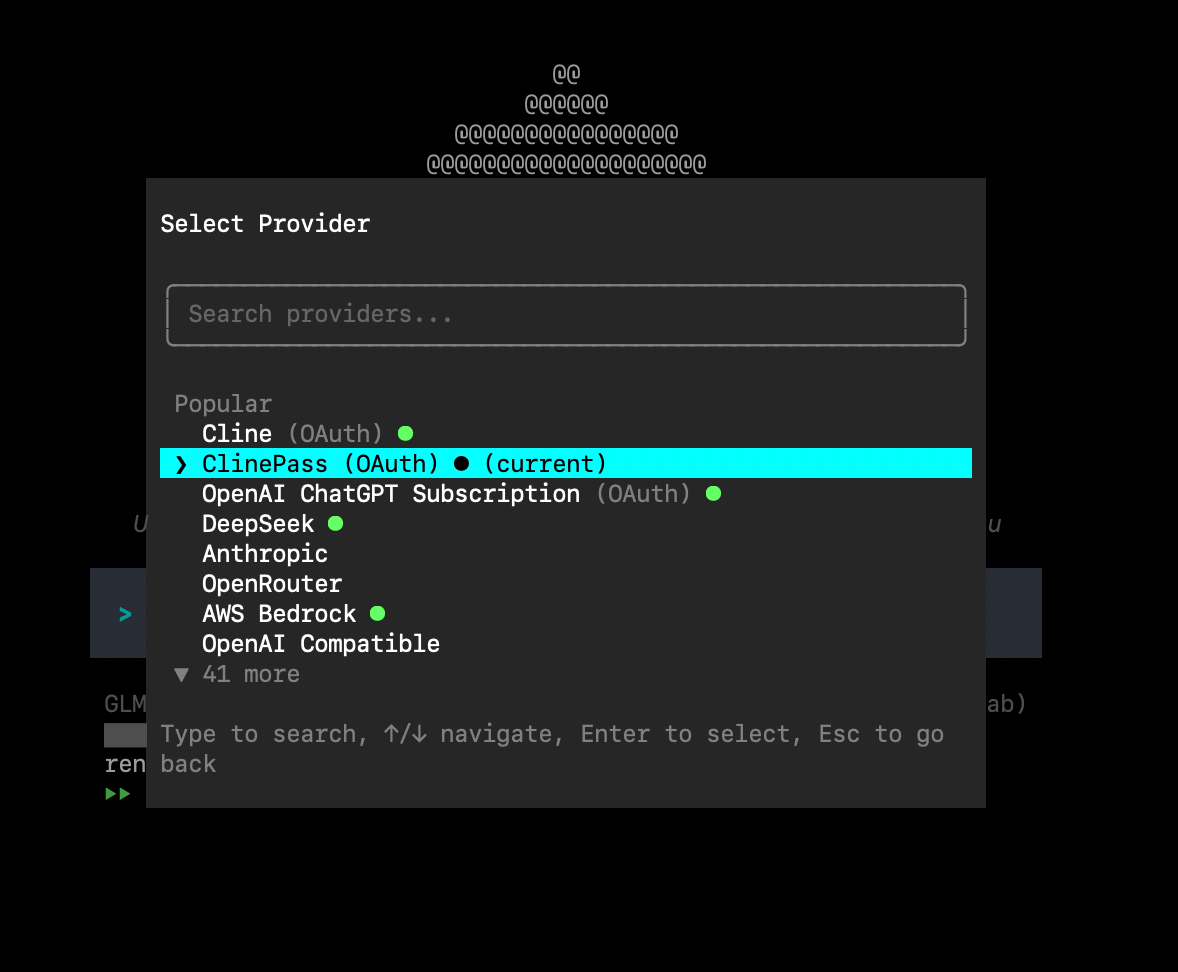
ClinePass is a separate provider in Cline. After subscribing, select **ClinePass** wherever you configure your provider.
* **IDE Extension**: Go to IDE extension settings, set **API Provider** to **ClinePass**, and sign in.
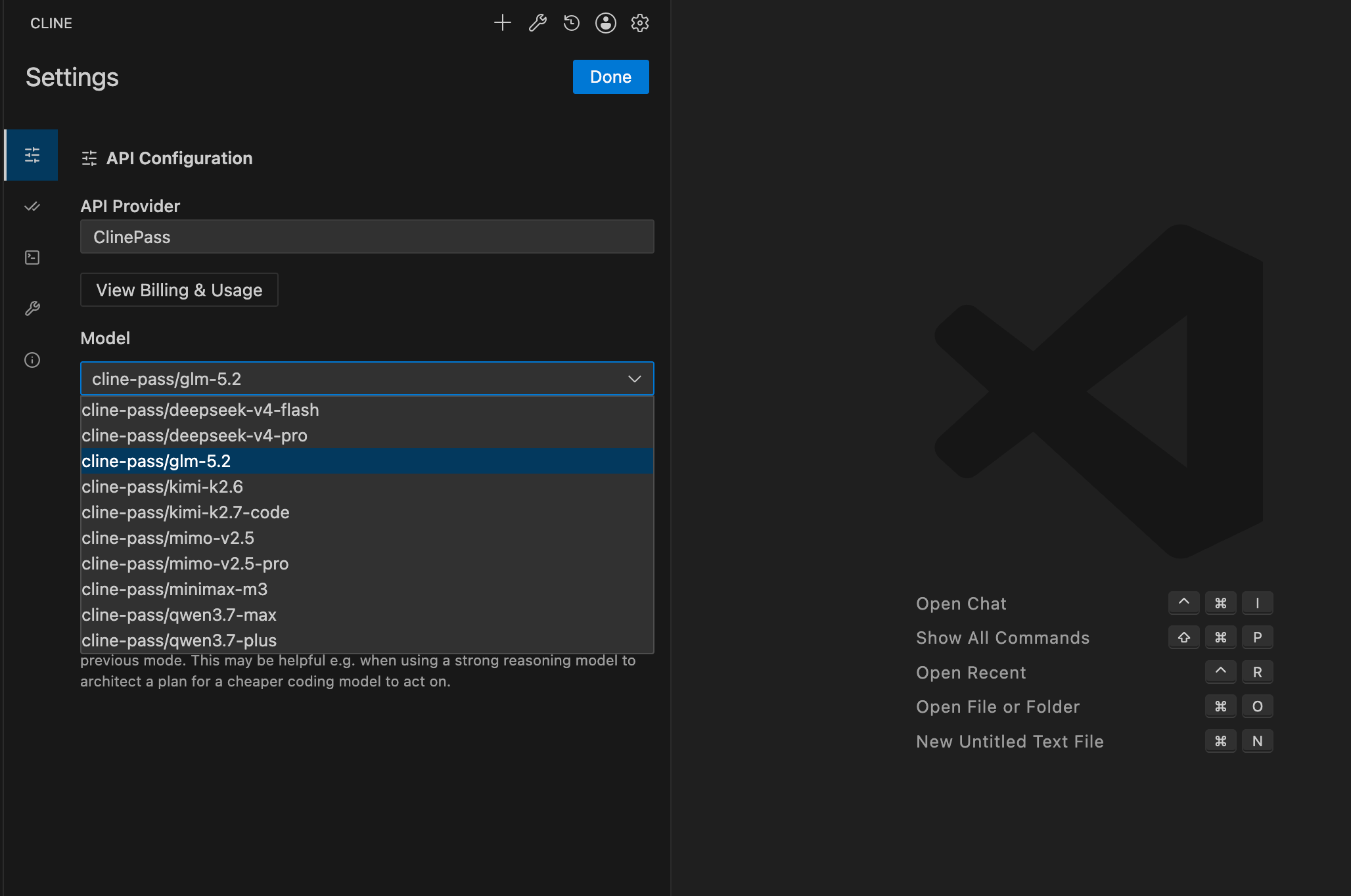 * **CLI**: Go to `/settings` and select **ClinePass** as your provider.
 ## Why ClinePass
Open models have gotten really good. They now reach performance close to proprietary models for coding tasks, and because many providers can serve them competitively, they're usually far cheaper.
However, getting reliable access can be difficult. Providers vary in quality and availability, and standard rate limits can throttle heavy agentic workflows that read files, run commands, and iterate across many turns.
ClinePass solves this by:
* Curating a select group of open models tested and benchmarked for coding agent use
* Offering **2-5x the usage** on popular open coding models compared to standard API rate, so you can run long, complex agent tasks without interruption
* Providing stable access through Cline's infrastructure
ClinePass is a separate provider from Cline (usage-billing). You can use both independently — subscribe to ClinePass for 2-5x the usage on popular open coding models compared to standard API rate, or use Cline (usage-billing) for pay-as-you-go access.
## Models
ClinePass includes the following models, tested and benchmarked for coding agent use:
| Model | Model ID |
| ----------------- | ------------------------------ |
| GLM-5.2 | `cline-pass/glm-5.2` |
| Kimi K3 | `cline-pass/kimi-k3` |
| Kimi K2.7 Code | `cline-pass/kimi-k2.7-code` |
| Kimi K2.6 | `cline-pass/kimi-k2.6` |
| DeepSeek V4 Pro | `cline-pass/deepseek-v4-pro` |
| DeepSeek V4 Flash | `cline-pass/deepseek-v4-flash` |
| MiMo-V2.5 | `cline-pass/mimo-v2.5` |
| MiMo-V2.5-Pro | `cline-pass/mimo-v2.5-pro` |
| MiniMax M3 | `cline-pass/minimax-m3` |
| Qwen3.7 Max | `cline-pass/qwen3.7-max` |
| Qwen3.7 Plus | `cline-pass/qwen3.7-plus` |
## Using ClinePass outside of Cline
You can use ClinePass models from your own scripts, apps, or automation through the Cline API. The API uses the same OpenAI-compatible Chat Completions format as the rest of Cline's API.
To get started, create an API key from **Settings > API Keys** in [app.cline.bot](https://app.cline.bot). For the complete walkthrough, see the [Cline API Getting Started guide](/api/getting-started).
Use the full ClinePass model slug in the `model` field:
```bash theme={"system"}
export CLINE_API_KEY="your_api_key_here"
curl -X POST https://api.cline.bot/api/v1/chat/completions \
-H "Authorization: Bearer $CLINE_API_KEY" \
-H "Content-Type: application/json" \
-d '{
"model": "cline-pass/qwen3.7-max",
"messages": [
{"role": "user", "content": "Write a TypeScript function that validates an email address."}
],
"stream": false
}'
```
## Reference pricing
ClinePass is a flat monthly subscription, so you are not charged the individual API prices below. These reference prices show the underlying per-1M-token rates for each model and can help you understand how usage is measured against your ClinePass quota (2-5x quota compares to paying standard api rate).
| Model | Input | Output | Cached Read | Cached Write |
| ---------------------------- | ------ | ------- | ----------- | ------------ |
| GLM-5.2 | \$1.40 | \$4.40 | \$0.26 | - |
| Kimi K3 | \$3.00 | \$15.00 | \$0.30 | - |
| Kimi K2.7 Code | \$0.95 | \$4.00 | \$0.19 | - |
| Kimi K2.6 | \$0.95 | \$4.00 | \$0.16 | - |
| DeepSeek V4 Pro | \$1.74 | \$3.48 | \$0.0145 | - |
| DeepSeek V4 Flash | \$0.14 | \$0.28 | \$0.0028 | - |
| MiMo-V2.5 | \$0.14 | \$0.28 | \$0.0028 | - |
| MiMo-V2.5-Pro | \$1.74 | \$3.48 | \$0.0145 | - |
| MiniMax M3 | \$0.30 | \$1.20 | \$0.06 | - |
| Qwen3.7 Max | \$2.50 | \$7.50 | \$0.50 | \$3.125 |
| Qwen3.7 Plus (≤ 256K tokens) | \$0.40 | \$1.60 | \$0.04 | \$0.50 |
| Qwen3.7 Plus (> 256K tokens) | \$1.20 | \$4.80 | \$0.12 | \$1.50 |
## Usage
ClinePass measures usage against three limits:
* **5-hour rolling window** — your usage within rolling 5-hour period
* **Weekly** — your usage over the calendar week
* **Monthly** — your usage over the calendar month
To check your current usage, visit your [Cline dashboard](https://app.cline.bot/dashboard/subscription?personal=true).
## Related
* [Cline (usage-billing)](/getting-started/cline-provider)
* [Authorization](/getting-started/authorizing-with-cline)
* [Local models](/running-models-locally/overview)
## Why ClinePass
Open models have gotten really good. They now reach performance close to proprietary models for coding tasks, and because many providers can serve them competitively, they're usually far cheaper.
However, getting reliable access can be difficult. Providers vary in quality and availability, and standard rate limits can throttle heavy agentic workflows that read files, run commands, and iterate across many turns.
ClinePass solves this by:
* Curating a select group of open models tested and benchmarked for coding agent use
* Offering **2-5x the usage** on popular open coding models compared to standard API rate, so you can run long, complex agent tasks without interruption
* Providing stable access through Cline's infrastructure
ClinePass is a separate provider from Cline (usage-billing). You can use both independently — subscribe to ClinePass for 2-5x the usage on popular open coding models compared to standard API rate, or use Cline (usage-billing) for pay-as-you-go access.
## Models
ClinePass includes the following models, tested and benchmarked for coding agent use:
| Model | Model ID |
| ----------------- | ------------------------------ |
| GLM-5.2 | `cline-pass/glm-5.2` |
| Kimi K3 | `cline-pass/kimi-k3` |
| Kimi K2.7 Code | `cline-pass/kimi-k2.7-code` |
| Kimi K2.6 | `cline-pass/kimi-k2.6` |
| DeepSeek V4 Pro | `cline-pass/deepseek-v4-pro` |
| DeepSeek V4 Flash | `cline-pass/deepseek-v4-flash` |
| MiMo-V2.5 | `cline-pass/mimo-v2.5` |
| MiMo-V2.5-Pro | `cline-pass/mimo-v2.5-pro` |
| MiniMax M3 | `cline-pass/minimax-m3` |
| Qwen3.7 Max | `cline-pass/qwen3.7-max` |
| Qwen3.7 Plus | `cline-pass/qwen3.7-plus` |
## Using ClinePass outside of Cline
You can use ClinePass models from your own scripts, apps, or automation through the Cline API. The API uses the same OpenAI-compatible Chat Completions format as the rest of Cline's API.
To get started, create an API key from **Settings > API Keys** in [app.cline.bot](https://app.cline.bot). For the complete walkthrough, see the [Cline API Getting Started guide](/api/getting-started).
Use the full ClinePass model slug in the `model` field:
```bash theme={"system"}
export CLINE_API_KEY="your_api_key_here"
curl -X POST https://api.cline.bot/api/v1/chat/completions \
-H "Authorization: Bearer $CLINE_API_KEY" \
-H "Content-Type: application/json" \
-d '{
"model": "cline-pass/qwen3.7-max",
"messages": [
{"role": "user", "content": "Write a TypeScript function that validates an email address."}
],
"stream": false
}'
```
## Reference pricing
ClinePass is a flat monthly subscription, so you are not charged the individual API prices below. These reference prices show the underlying per-1M-token rates for each model and can help you understand how usage is measured against your ClinePass quota (2-5x quota compares to paying standard api rate).
| Model | Input | Output | Cached Read | Cached Write |
| ---------------------------- | ------ | ------- | ----------- | ------------ |
| GLM-5.2 | \$1.40 | \$4.40 | \$0.26 | - |
| Kimi K3 | \$3.00 | \$15.00 | \$0.30 | - |
| Kimi K2.7 Code | \$0.95 | \$4.00 | \$0.19 | - |
| Kimi K2.6 | \$0.95 | \$4.00 | \$0.16 | - |
| DeepSeek V4 Pro | \$1.74 | \$3.48 | \$0.0145 | - |
| DeepSeek V4 Flash | \$0.14 | \$0.28 | \$0.0028 | - |
| MiMo-V2.5 | \$0.14 | \$0.28 | \$0.0028 | - |
| MiMo-V2.5-Pro | \$1.74 | \$3.48 | \$0.0145 | - |
| MiniMax M3 | \$0.30 | \$1.20 | \$0.06 | - |
| Qwen3.7 Max | \$2.50 | \$7.50 | \$0.50 | \$3.125 |
| Qwen3.7 Plus (≤ 256K tokens) | \$0.40 | \$1.60 | \$0.04 | \$0.50 |
| Qwen3.7 Plus (> 256K tokens) | \$1.20 | \$4.80 | \$0.12 | \$1.50 |
## Usage
ClinePass measures usage against three limits:
* **5-hour rolling window** — your usage within rolling 5-hour period
* **Weekly** — your usage over the calendar week
* **Monthly** — your usage over the calendar month
To check your current usage, visit your [Cline dashboard](https://app.cline.bot/dashboard/subscription?personal=true).
## Related
* [Cline (usage-billing)](/getting-started/cline-provider)
* [Authorization](/getting-started/authorizing-with-cline)
* [Local models](/running-models-locally/overview)